Sharing photos with friends and family should be effortless, yet it often becomes a complicated mess of texts, emails, and various file-sharing platforms. That’s where shared albums come in – a game-changing solution that lets everyone contribute their memories to a single, organized collection.
We’ve all experienced the frustration of trying to gather photos after a group vacation or special event. Shared albums eliminate these hassles by creating a collaborative space where multiple users can add their favorite shots with just a few taps. Whether you’re planning a one-time event or looking for ongoing collaboration, these digital albums offer a streamlined way to collect and view everyone’s perspectives of shared experiences.
What Are Shared Albums?
Shared albums act as collaborative digital repositories where multiple users add photos to a single collection. These albums function separately from personal photo libraries, creating a dedicated space for group memories.
Key features of shared albums include:
- Access control settings for selective sharing with specific group members
- Options to enable public viewing through shareable URLs
- Capability to add comments on individual photos
- Storage independence from personal photo libraries
- Support for both one-time events or ongoing collections
The structure of shared albums contains:
- A unique album name for easy identification
- Multiple contributor permissions
- Real-time photo updates from all members
- Viewing capabilities across different devices
Shared albums excel in various scenarios:
- Group travel documentation
- Event photography collections
- Project collaboration spaces
- Family photo sharing
- Community building activities
Users maintain control over their contributions by selecting specific photos to share while keeping private photos separate. The collaborative nature creates an interactive experience as members view different perspectives of shared moments through each contributor’s lens.
Benefits of Using Shared Albums

Shared albums offer distinct advantages for photo collaboration:
- Storage Efficiency
- Creates separate copies for shared content
- Keeps personal library organized
- Maintains shared photos even if originals are deleted
- Collaborative Features
- Multiple contributors add photos simultaneously
- Comments enable interactive discussions
- Each member controls their own contributions
- Access Management
- Owner controls overall album settings
- Selective sharing with specific individuals
- Optional public viewing through secure URLs
- Event Documentation
- Captures multiple perspectives of shared experiences
- Centralizes photos from group activities
- Simplifies post-event photo collection
- Organizational Control
- Custom album naming for easy identification
- Independent from personal photo libraries
- Flexible content management options
| Feature | Personal Albums | Shared Albums |
|---|---|---|
| Storage | References original photos | Creates separate copies |
| Access | Private only | Multiple contributors |
| Deletion | Affects all copies | Individual control |
| Organization | Part of personal library | Separate collection |
| Sharing | Limited options | Multiple sharing methods |
Shared albums function as independent repositories where invited members interact with content through comments while maintaining individual control over their contributions. The separation from personal libraries ensures privacy management alongside collaborative engagement.
Creating Your First Shared Album

Creating a shared album starts with accessing your photo library’s album section and selecting the option to create a new shared collection. The process involves simple steps to establish sharing permissions and invite contributors.
Setting Up Sharing Permissions
Shared albums offer two primary visibility options: private and public sharing. To configure visibility settings:
- Tap Albums and select the newly created shared album
- Click the Add Subscribers button
- Toggle between private sharing for specific contacts
- Enable Public Website option to generate a shareable URL
- Adjust contributor permissions for adding photos or videos
- Set viewing rights for non-contributors
Inviting Contributors
Adding contributors expands the album’s collaborative potential through these steps:
- Select People to Share With during album creation
- Enter email addresses or phone numbers of intended contributors
- Send automatic invitations to selected contacts
- Add optional welcome message for context
- Monitor pending invitations in the album settings
- Enable additional contributors after initial setup
| Permission Type | Access Level | Features |
|---|---|---|
| Private Sharing | Invited Only | Full control, selective access |
| Public URL | Anyone with Link | View-only, shareable link |
| Contributor | Added Members | Upload photos, add comments |
| Viewer | Basic Access | Browse photos only |
Managing Shared Album Content
Shared albums offer collaborative features for organizing digital memories with multiple contributors. The management tools enable efficient content organization while maintaining individual control over contributions.
Adding Photos and Videos
Adding content to shared albums involves three streamlined steps:
- Select photos or videos from the library tab using the selection tool
- Tap the share button to access sharing options
- Choose the target shared album from the list to post content
Additional upload methods include:
- Dragging photos directly from the library to the shared album sidebar
- Clicking the “Add photos and videos” button in an open shared album
- Using the quick-add button within album views
Organizing and Editing Files
The organizational structure of shared albums maintains clear content management:
- Contributors delete only their own uploaded content
- Album owners retain full deletion rights for any content
- Each added photo creates a separate copy from the original library file
- Automatic notifications alert members when new content appears
- Content remains in the shared album even if original files are deleted
- Subscriber posting controls through the People button
- Batch selection tools for multiple file operations
- Direct deletion options using keyboard shortcuts or menu commands
- Independent file organization from personal libraries
- Real-time updates across all member devices
Privacy and Security Settings

Shared albums incorporate multiple privacy layers to protect user content while enabling collaborative sharing. The security settings include:
Access Control Options
- Private mode limits visibility to invited members only
- Public link sharing with optional password protection
- Contributor-specific permissions for adding content
- View-only access for non-contributing members
- Time-limited sharing links for temporary access
Data Protection Features
- End-to-end encryption for photo transfers
- Two-factor authentication for album access
- Automatic backup of shared content
- Secure cloud storage with redundancy
- Digital rights management for downloaded content
Permission Management
- Granular control over member roles
- Bulk permission updates for multiple users
- Activity logging for all member actions
- Remote access revocation capabilities
- Custom sharing restrictions by region
| Feature | Private Mode | Public Mode |
|---|---|---|
| Member Visibility | Hidden | Visible |
| Download Rights | Restricted | Unrestricted |
| Comment Access | Members Only | Anyone with Link |
| Search Indexing | Disabled | Optional |
| Content Sharing | Internal | External |
These settings ensure album owners maintain complete control over their shared content while facilitating secure collaboration among members. Each privacy option includes customizable parameters for specific sharing scenarios.
Popular Sharing Platforms Compared
Major platforms offer distinct approaches to shared albums, each with unique features tailored to specific sharing needs:
Google Photos
- Unlimited contributors in shared albums
- Automatic photo organization with AI recognition
- 15GB free storage across Google services
- Cross-platform compatibility on iOS Android devices
- Real-time notifications for new additions
Apple iCloud
- Seamless integration with iOS devices
- Up to 100 contributors per shared album
- 5GB free storage for new accounts
- Activity updates appear in Photos app
- Direct sharing through Messages app
Amazon Photos
- Unlimited photo storage for Prime members
- Family Vault feature for up to 6 users
- Advanced search capabilities
- Auto-backup from mobile devices
- Direct printing services integration
| Platform | Free Storage | Max Contributors | Supported Formats |
|---|---|---|---|
| Google Photos | 15GB | Unlimited | Photos Videos GIFs |
| iCloud | 5GB | 100 | Photos Videos Live Photos |
| Amazon Photos | Unlimited* | 6 | Photos RAW files Videos |
*Unlimited storage applies to Prime members
Dropbox
- File versioning system
- Selective sync options
- 2GB free storage space
- Password protection for shared links
- Desktop folder integration
- Integration with Microsoft 365
- 5GB free storage space
- Album co-owner capabilities
- Automatic tagging system
- Built-in photo editor
These platforms support various sharing configurations with distinct storage limits access controls collaborative features.
Conclusion
Shared albums have revolutionized how we capture and preserve our collective memories. They’ve transformed the way we collaborate on photo collections while maintaining control over our private content.
We’ve seen how these digital spaces bring people together creating a more engaging and interactive way to share life’s moments. Whether it’s organizing family gatherings documenting group travels or building community archives shared albums offer a secure and efficient solution.
The future of photo sharing is here with robust privacy settings seamless collaboration tools and cross-platform accessibility. By embracing shared albums we’re not just storing photos – we’re creating dynamic digital spaces that bring our shared experiences to life.

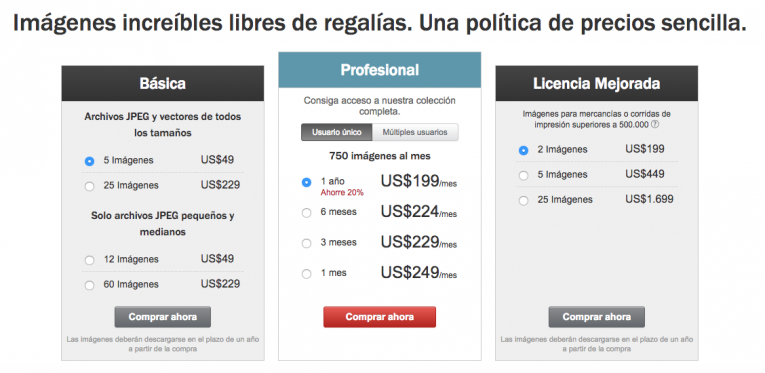
 Si buscas imágenes libres de derechos de alta resolución, al mejor precio y con los mejores beneficios, seguramente has pensado en